The storefront is the one call that tells your game what a player can buy right now. In the PowerUp Godot
monetization SDK, PowerUp.fetch_storefront() returns every live offer with its price, what it grants,
whether this player can buy it and, if not, why. Your game draws it. This page covers the payload, the two
nodes that draw it for you, and the display rules the SDK won't break.
Fetch it
var r: Dictionary = await PowerUp.fetch_storefront()
if r.ok:
    _render(r.storefront)
The result is ok plus storefront. The SDK keeps the last one in PowerUp.last_storefront and fires
storefront_loaded, or storefront_failed with the reason. Fetch it each time the store opens: when you
publish a new version, the game picks it up on its next request.
An offer is listed when it's active, inside its start and end times, sold on this platform, and grants only
items this build can show (PowerUp checks your appVersion). A season pass offer is listed only while its
pass is running, and No Ads only while an interstitial or banner it would remove is live.
The payload
| Field | What it holds |
|---|---|
offers | Every live offer, subscriptions included, in the order set in the console |
featured | The first lobby_featured offer the player can still buy, or null |
subscriptions | Every live subscription. premium is the first of them |
noAds | The No Ads offer and whether the player has it, or null |
freeOffers | Free rewards on a cooldown, with nextAvailableAt and claimsLeftToday |
adOffers | Rewarded ads that pay coins, with how many are left today |
spendLimit | enforced, monthlyUsd, spentUsd and remainingUsd |
ageGate | Whether the age question is still needed, and the player's age band |
purchaseBlocked | Null, or why this player can't buy anything right now |
game, player | The game's name and environment, and the player asking |
serverNow, configVersion | The server's time, and the published version this came from |
featured, premium and noAds.offer are offers that also appear in offers. Group the list yourself by
kind (bundle, pack, item, pass or subscription) and by placement (store, lobby_featured or
contextual).
An offer
Here's a coin bundle from the seeded buggs.io demo, recorded in the sandbox and trimmed a little:
{
  "key": "coins_1500",
  "name": "Chest of Coins",
  "kind": "bundle",
  "placement": "store",
  "priceUsd": 9.99,
  "displayPrice": "$9.99",
  "rail": "stripe",
  "productId": "coins_1500",
  "basePlanId": null,
  "storeType": "consumable",
  "grants": { "coins": 1500, "bonusCoins": 0, "items": [] },
  "reference": { "multiplier": 1.2, "baselineKey": "coins_120", "verified": true },
  "startsAt": null,
  "endsAt": null,
  "owned": false,
  "purchasesLeft": null,
  "subscription": null,
  "disclosures": { "price": true, "currencyRateUsd": 0.00825, "renewalTerms": false, "cancelPath": false, "perks": false },
  "purchasable": true,
  "notPurchasableReason": null
}
| Field | Meaning |
|---|---|
key, name, description | The offer's id, and the words to show |
kind, placement | What it is, and where it belongs |
priceUsd, displayPrice | The list price in US dollars, and that price as text |
rail | How it's paid on this platform: stripe on web and desktop, apple on iOS, google on Android |
productId, basePlanId | The id it's sold under in that store, and a Play subscription's base plan |
storeType | consumable, non_consumable, auto_renewable or non_renewing |
grants | coins, bonusCoins (a subscriber's bonus on coin packs) and items |
reference | The value badge's multiplier, the baselineKey it's measured against, and whether it's verified |
startsAt, endsAt | The sale window, set on the server. Null means open |
owned, purchasesLeft | Whether the player already has it, and how many more they can buy (null for no limit) |
subscription | period, periodLabel, renews, cancelHow, trialDays and perks |
disclosures | What the card must show: price, currencyRateUsd, renewalTerms, cancelPath, perks |
purchasable, notPurchasableReason | Whether this player can buy it now, and if not, why |
notPurchasableReason is one of not_available, owned, purchase_limit_reached, age_gate_required,
parental_consent_required or spend_limit_reached, checked in that order.
The display rules
The SDK draws offers through PowerUpDisclosure, a set of pure static functions. PowerUpOfferButton
applies all of these rules, and a card you build yourself gets them by calling the same functions:
- A value badge needs proof. "1.2× value" only renders when the server checked the bundle against a
real baseline offer (
reference.verified). A subscriber's Premium bonus never counts toward it. On iOS and Android,store_badge_text()also hides it when the store's own prices put the ratio more than 2% off. - Countdowns need a real end. A countdown only runs to the server's
endsAt, measured on the server's clock. No end time, no countdown. An offer past its end stays disabled even if an old payload still says it's for sale. - No price, no button. A card the server didn't give a price shows "Price unavailable" and can't be pressed.
- Coins show what they cost. A coin amount comes with its real-money value beside it, not in a tooltip: "1,200 coins (≈ $9.90)".
- Subscriptions carry their terms. A subscription card lists its price per period, whether it renews, how to cancel and any trial. If the price, the period, the renewal terms or the way to cancel is missing, the card can't be bought and says "Subscription terms missing".
- Blocks are shown. When a player can't buy something, the card says why ("Owned", "Monthly spending limit reached", "Confirm your birth year to buy") instead of failing quietly.
The publish checks hold your config to the same rules before it ships, so these guards are a second line in the client: a slip in your UI code can't bring back a badge or a countdown the server didn't back.
The functions you'll use most:
| Function | Returns |
|---|---|
display_price(offer, localized = "") | The price to show, or "" when the card has none. A store's localized string wins |
currency_line(offer) | "1,200 coins (≈ $9.90)" |
bonus_line(offer) | "+240 Premium bonus" |
badge_text(offer) | "1.15× value", or "" |
seconds_remaining(offer, now_unix) | Seconds until endsAt, or -1 |
subscription_lines(offer, localized = "") | Price per period, renewal, cancel path and trial, or an empty list when a term is missing |
perk_lines(offer) | A subscription's perks, one line each |
blocking_reason(offer, localized = "") | Why the card can't be bought, or "" |
blocking_text(reason), blocking_short(reason) | The words for a notPurchasableReason, full and button-sized |
spend_limit_notice(storefront) | "Monthly limit: $4.99 of $50.00 used", when a limit applies |
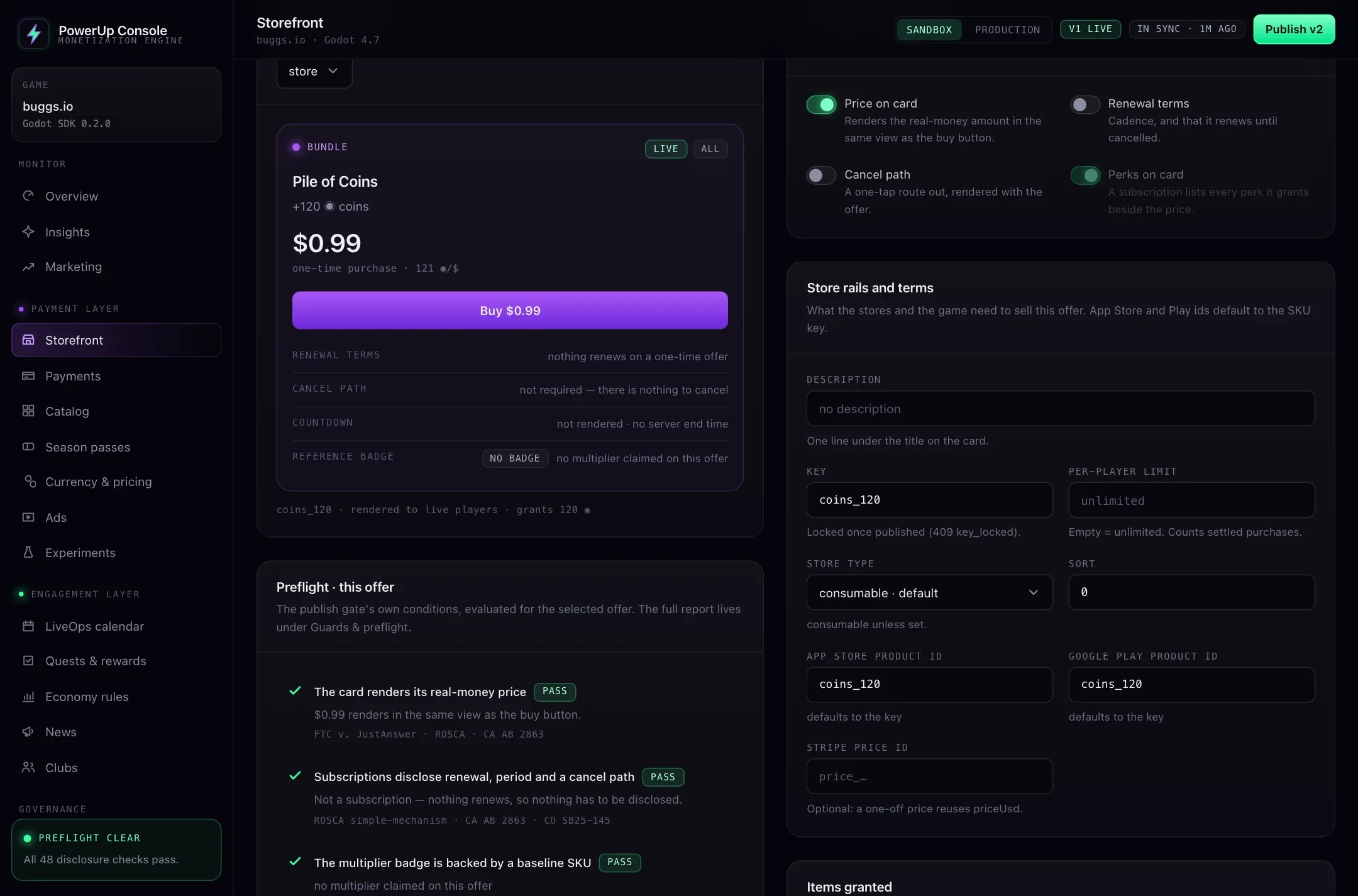
PowerUpOfferButton
PowerUpOfferButton is a regular Godot Button that writes its own text from those rules:
var button := PowerUpOfferButton.new()
button.configure(offer)
button.offer_pressed.connect(_on_offer_pressed)
%OfferGrid.add_child(button)
The card reads, top to bottom: the name (with "[1.2x verified]" when the badge may show), the price or "Price
unavailable", the coin line, any Premium bonus, the countdown ("Ends in 2d 4h") or "Offer ended", a
subscription's terms and perks, and the reason it's blocked. It disables itself when the offer can't be
bought and puts the reason in its tooltip. offer_pressed(offer) only fires for an offer that can be bought.
The countdown runs on the server's clock while the PowerUp autoload is running. Because it's a Button,
your theme styles it like any other. The SDK sets its text, a 220-pixel minimum width, left alignment and
word wrap, and dims it while it's disabled.
Store prices on phones
On iOS and Android, show the store's own localized price. The button draws the server's US dollar price, so
on phones build the card from PowerUpDisclosure and pass the store's string as localized:
# store_prices: product id → what Play Billing or StoreKit returned for it
# (the formatted string, or a Dictionary with it and the amount)
func _fill_card(offer: Dictionary, offers: Array, store_prices: Dictionary) -> void:
    if not PowerUpDisclosure.store_has_product(offer, store_prices):
        hide()   # the store didn't return it, so it can't be bought here
        return
    var local := PowerUpDisclosure.store_price(offer, store_prices)
    %Price.text = PowerUpDisclosure.display_price(offer, local)
    %Terms.text = "\n".join(PowerUpDisclosure.subscription_lines(offer, local))
    %Badge.text = PowerUpDisclosure.store_badge_text(offer, offers, store_prices)
    %Buy.disabled = PowerUpDisclosure.blocking_reason(offer, local) != ""
PowerUpStorefront
PowerUpStorefront is a whole store screen: a VBoxContainer that fetches the storefront, builds a grid of
offer buttons and shows the spend-limit notice. Add it to a scene and call load_offers(). It rebuilds the
grid each time, so calling it again is safe.
| Member | What it does |
|---|---|
columns | Grid columns. Default 3 |
show_spend_limit | Show the monthly limit notice. On by default |
load_offers() | Fetch the storefront and draw it |
offer_purchased(result) | A purchase went through, and the grid redraws |
offer_failed(reason) | A purchase was refused, with the server's reason |
Its buy path calls PowerUp.purchase(), which only works with sandbox keys. That makes it a quick way to try
your store while you set things up. For real money, build the grid from PowerUpOfferButton and send
offer_pressed to the checkout for the offer's rail, as payments shows.
Free offers, coin prices and limits
Not everything in a store costs money:
- Free offers in
freeOffersare claimed withPowerUp.claim_free_offer(key). A claim too soon answerscooldownordaily_cap, withdetails.nextAvailableAt; count down to it withPowerUp.seconds_until(). - Items for coins come from your catalog (
PowerUp.fetch_catalog(), where a coin-buyable item hasprice.coins) and are bought withPowerUp.buy_item(item_key, expected_price). Pass the price the player saw. If it changed, the server answersprice_changedwith the new price indetails.priceCoinsinstead of charging a different amount. The coin wallet page covers the wallet behind it. - Spending limits. When
spendLimit.enforcedis true, the player is a child or teen with a monthly limit: showPowerUp.spend_limit_notice()near the buy buttons. - Blocked stores. When
purchaseBlockedisage_gate_required, ask the age question first (getting started shows how).parental_consent_requiredmeans a child whose parent hasn't approved purchases: show the store read-only.