A Godot season pass gives players a reason to come back every day of a season: a ladder of tiers, a free reward on each one, and a second, premium reward on each one for players who pay. This page explains how PowerUp runs season passes for Godot 4 games: where progress comes from, how the premium track is sold, and what happens to unclaimed rewards when a season ends. If you'd rather build one step by step, with the design decisions and the GDScript, read how to make a battle pass in Godot.
Two kinds of pass
PowerUp has two kinds, and a game can run both:
- A starter pass for new players. It has no end date, and it stays the player's current pass until they finish it. Stars earned past its last tier move on to the season.
- Seasonal passes, each with a real start and end. Only one season runs at a time, and a game has at most one starter pass.
Each pass has a free track, a premium track, or both, and up to 200 tiers. A tier asks for a total number of stars, and that total never goes down from one tier to the next. Each track's reward on a tier is coins or an item from your catalog. It's never stars, so a pass can't feed itself.
Progress comes from real matches
Players fill a pass with stars, and stars come from two places:
- Online matches. Your game server reports each finished match, and the report decides the stars: a base amount per match plus an amount per kill, capped per match and per day, with a minimum match length. You set those numbers in the console's economy rules and can try them in its calculator first.
- Quests, events and club tournaments that pay stars. They're counted from the same match reports.
The game client never reports progress: it reads the pass and claims what the server already counted. A modified client can't give itself stars, offline matches don't earn any, and no product sells them, so nobody can buy or cheat their way up the ladder.
Between seasons, when there's no current pass, stars wait in a star bank up to a cap (500 by default; stars over it are dropped) and move into the next pass the first time the player shows up after it starts. The SDK has a line for telling the player: "Stars are saved for the next pass, up to 500."
Premium: sold, included, or both
The premium track can be bought, come with a subscription, or both:
- A pass product. It sells like any other product: through Stripe on web and desktop builds, the App Store on iOS and Google Play on Android. It's only on sale while its pass is running.
- Included with a subscription. A subscription with the premium pass perk switches the track on while the pass is current. The pass only says "Included with Premium" when such a subscription is on sale on that platform, so the game never advertises something it doesn't sell.
Buying late is fine. Premium covers the whole pass, so every premium tier the player already reached becomes claimable at once (or is added straight away on an auto-claim pass). If the purchase is refunded, the premium track locks again and the rewards already claimed stay with the player. Restoring purchases on a new phone brings the premium track back. In-app purchases for Godot covers how the store checkouts work.
Claiming, and the end of a season
You choose how rewards land, pass by pass:
- Auto-claim. Each reward is added as the player reaches its tier.
- Tap to claim. Rewards wait for the player to collect them. When the season ends, every free reward they reached and didn't claim is added for them anyway.
So free rewards are never lost either way. Each pass also carries its close rule in words the game shows beside it, for example "Free rewards you reach are added automatically when the pass ends."
Premium rewards a player reaches without premium need premium before the season ends. The player hears about each one when they reach it, not on the last day: the next quest claim, event claim or ticketed match result lists it, and the SDK writes the line, such as "Tier 5 premium reward: 45 coins. Unlock Premium before Nov 19, 2026, 14:57 UTC to claim it."
The last-chance prompt
You may want a "season ending" offer. PowerUp allows one, inside limits the server applies:
- only on a seasonal pass, in a window before it ends that you pick, up to 72 hours
- only to players who reached at least one premium reward without premium, while the premium product can be bought
- only to adults, unless you switch it on for younger players, and never to a player whose age the game doesn't know
- at most once every 24 hours
The prompt lists only the premium rewards the player already reached, the price, and "Declining keeps everything you've earned." Declining needs no call and changes nothing.
Checked before you publish
Pass changes wait in a draft like everything else in the console. Five of the 48 publish checks are about passes, and if one fails, nothing ships:
| Check | What it stops |
|---|---|
| Rewards auto-claim or disclose expiry | A tap-to-claim pass that only reveals its deadline at the end |
| Season windows are real | A season that ends before it starts, two overlapping seasons, or two starter passes |
| Every premium track has a price | A premium track with no priced pass product and no priced subscription that includes it |
| Tiers and rewards are real | Gaps in the tiers, star totals that go down, missing or archived items, 0-coin rewards, stars as a reward |
| Last-chance prompts are honest | A prompt on a pass with no end, a premium product not on sale at a shown price, no earn-time notice or auto-claim, or a window over 72 hours |
How the publish checks work covers the rest of them. PowerUp checks your setup against the rules built into it. That isn't legal advice, and your game's compliance is still up to you.
In your Godot game
The Godot SDK hands you the pass as plain dictionaries. The lobby gets a summary
from fetch_home(), the pass screen gets every tier from fetch_passes(), and claim_pass() claims:
func _open_pass_screen() -> void:
    var result: Dictionary = await PowerUp.fetch_passes()
    if not result.ok:
        return
    var season: Variant = result.passes.current
    if not (season is Dictionary):
        # Between seasons: say where the stars go.
        %Notice.text = PowerUpDisclosure.star_bank_notice(result.passes.starBankCap)
        return
    %CloseRule.text = PowerUpDisclosure.pass_close_rule(season)
    %Tiers.show_tiers(season.tiers)   # your UI: a free and a premium cell per tier
    await PowerUp.badges_seen("pass")

func _on_claim_all_pressed(pass_key: String) -> void:
    var result: Dictionary = await PowerUp.claim_pass(pass_key)   # no tier: claim everything ready
    if result.ok:
        for entry: Dictionary in result.claim.claimed:
            %Toasts.add(PowerUpDisclosure.reward_text(entry.reward))
The battle pass guide goes further: drawing each tier's state, selling the premium track on every platform, the earn-time notices, the last-chance prompt, and the match report your game server sends.
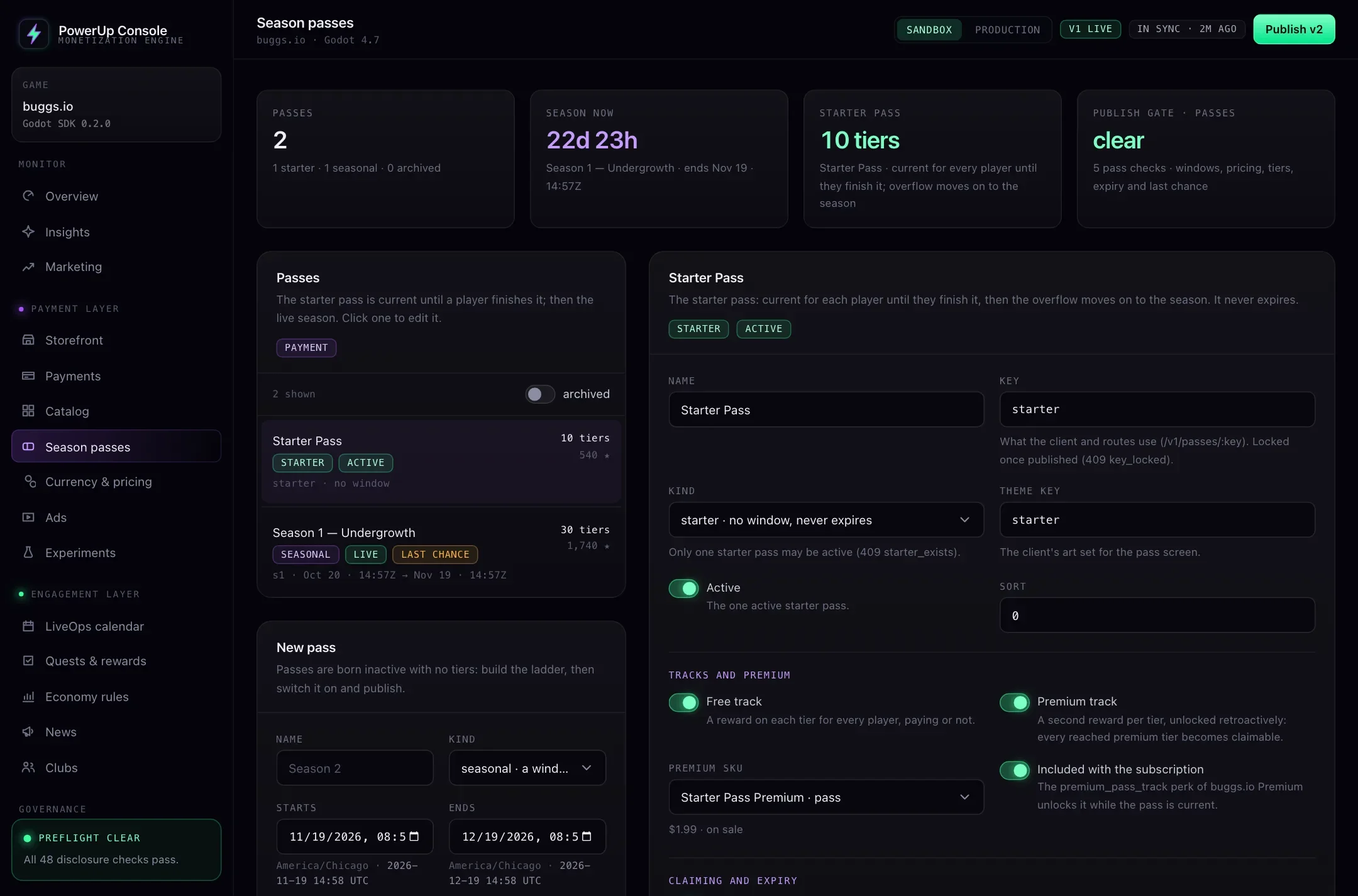
Where buggs.io stands
buggs.io is our own game, made by the same team as PowerUp. Its client already has the pass screens built in, but passes aren't switched on there yet, so the capture above is the console on the seeded demo, not the live game. The buggs.io case study says what it runs today.