A battle pass is a ladder of tiers that players climb by playing during a season, with a free reward and a premium reward on each tier. This guide builds a Godot battle pass in two parts. Part one is the design: tracks and tiers, where progress comes from so it can't be faked, claiming, selling the premium track, and what happens when the season ends. It applies whatever backend you use. Part two builds the battle pass system for Godot 4 with PowerUp's SDK, in GDScript you can adapt. For the feature overview, see season passes for Godot games.
Part 1: design the battle pass
Tracks and tiers
A pass has two tracks side by side:
- The free track is for everyone. It's what makes non-paying players feel the season is for them too.
- The premium track is what you sell: a second reward on each tier, for players who bought the pass.
Each tier needs a total amount of pass progress, and that total should only go up from one tier to the next. Rewards should be real things a player keeps: coins, skins, trails, characters. Don't reward the pass currency itself, or the pass starts paying for its own tiers.
Size the ladder from your earning rate, not the other way round. Say a match pays 10 progress points, your daily cap is 150 and the season lasts 30 days. A player who hits the cap every day earns 4,500. A player who plays a few matches most days earns far less. Put the last tier where the players you care about can reach it, and check the numbers again after a week of real data.
Where progress comes from
This is the decision that matters most. If the game client says "I earned 50 points", anyone with a memory editor or a modified build can say 5,000. So decide progress somewhere the player doesn't control:
- Your game server reports each finished match. It saw the match, so it knows how long it lasted and what happened. The client never sends progress at all.
- Each match counts once. Give every match an id and ignore a report you've already seen, so a retry after a timeout doesn't pay twice.
- Cap it. A cap per match and per day stops anyone farming the pass with throwaway matches, and a minimum match length stops players quitting at the loading screen for free points.
- Offline matches earn nothing. Nobody can check them.
Keep pass progress separate from other progression. PowerUp calls it stars, and they're apart from the online XP that items can be gated on. Separate numbers mean you can tune the season without moving anything else.
Claiming
You can add rewards as players reach each tier, or let them tap to collect. Whichever you choose, a reward has to be paid exactly once, even when a player double-taps, or claims on two devices at the same moment. That means the claim is decided on the server with a write that only succeeds once, and a client that retries after a lost answer sends the same request id, so the server replays its answer instead of acting twice.
Selling the premium track
The premium track is usually one purchase per season. Three things to know before you sell it:
- Each season is its own product. On the App Store, a non-consumable is "purchased once and does not expire" (Apple, In-App Purchase types, as of October 2026), so next season's premium needs a new product id.
- Restores and refunds. Apple's guidelines say you should have a restore mechanism for restorable purchases (App Review Guidelines 3.1.1, as of October 2026). Decide what a refund takes back too: the premium track for sure, but what about rewards the player already claimed?
- Google Play wants an acknowledgment. A purchase has to be acknowledged within three days, or Google refunds it and takes the entitlement back (Google Play Billing, as of October 2026).
Make premium retroactive. A player who buys on day 20 should get every premium reward they already reached, not grind those tiers again.
The end of the season
Most of the trust in a battle pass is won or lost here.
- Unclaimed free rewards. If players have to tap to claim, add whatever they reached and didn't claim when the season ends. Taking it away because they missed a deadline feels like a trick.
- Premium rewards reached without premium. Tell players when they reach one, with the date they can still buy premium until. Saving it all for a pop-up on the last day is pressure, not information.
- Between seasons. Progress earned when no season is running should wait for the next one, up to a cap.
- A "season ending" offer. If you show one, list only what the player already reached, show the price, show it rarely, and make declining cost nothing.
Store rules and compliance covers the rules PowerUp checks a pass against before you publish it.
A starter pass
A short pass with no end date gives new players a few early wins while they learn the game. When they finish it, extra progress can roll over into the season.
Part 2: build it with PowerUp
PowerUp runs the whole design above: the pass, the star rules, the claims, the premium track on three
checkouts, and the season close. Your game reads and claims, and your game server reports matches.
PowerUp is in early access: studios get the addon and their keys from us, and
the getting started docs cover the setup. The addon lives in addons/powerup/
and gives you the PowerUp autoload and the PowerUpDisclosure helpers used below.
1. Set up the pass in the console
In the console's Season passes screen, create a seasonal pass with its start and end (or a starter pass, which has neither). A new pass starts inactive and empty: build the tier ladder (up to 200 tiers, each with a free reward, a premium reward or both), choose auto-claim or tap to claim (tap to claim needs the earn-time notice on), pick the pass product that sells premium, and say whether a subscription includes it. Then switch it on and publish. Five publish checks look at passes, and if one fails, nothing ships.
Set the star rules in the console's economy rules: stars per match, stars per kill, the per-match and daily caps, and the minimum match length.
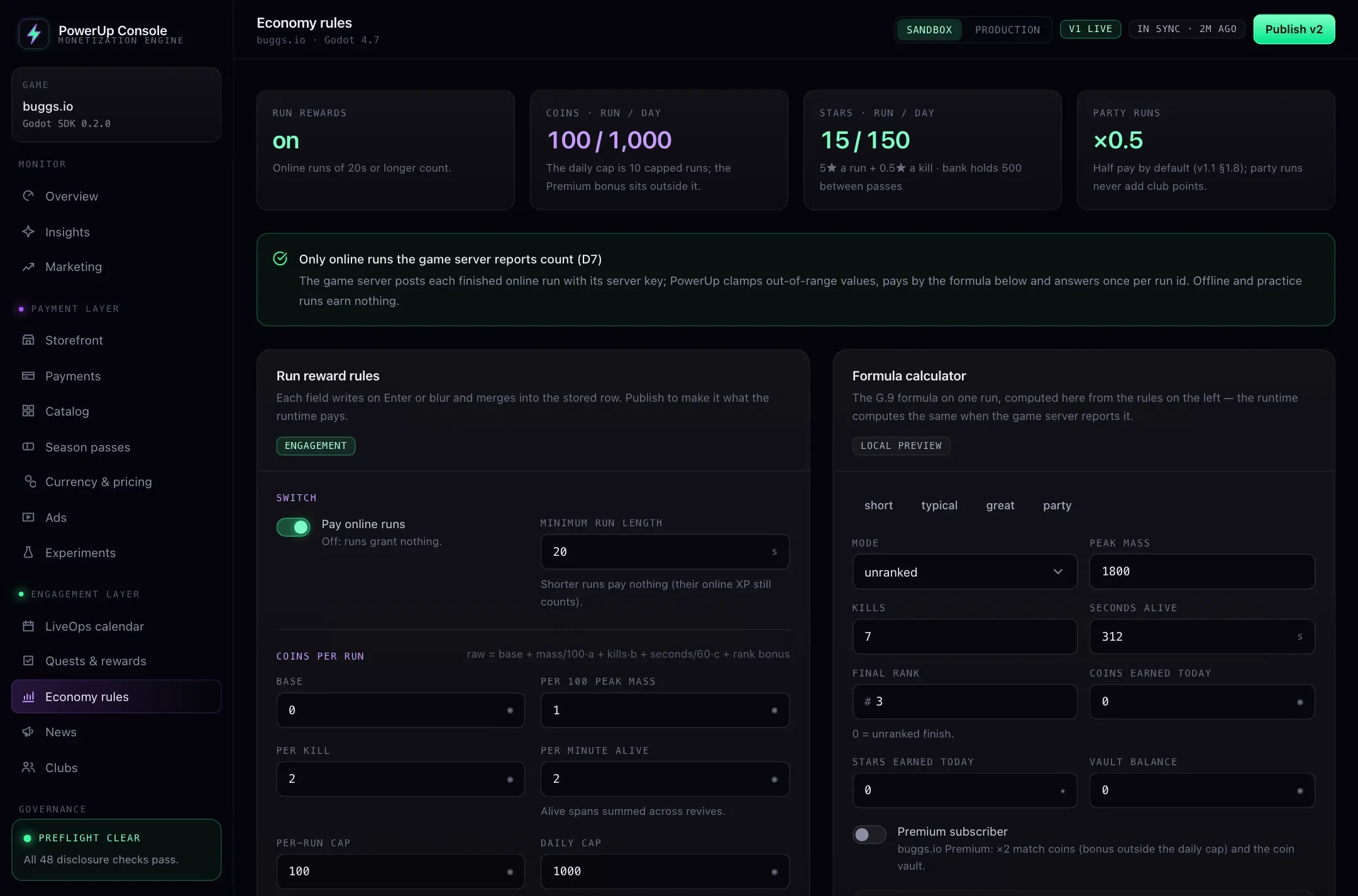
Those are the demo's numbers, not a recommendation. Its season has 30 tiers 60 stars apart, so the last tier needs 1,740 stars: about 12 days for a player who hits the daily cap, or about 174 matches at 10 stars a match.
2. Report matches from your game server
Before an online match, the client asks for a match ticket with PowerUp.request_match_ticket(), passing
the mode and the character the player picked, and hands the ticket to your game server when it joins. When the match ends, the server reports it once, with your server key,
which never ships inside the game:
{
  "runId": "7f6c1e9a-2b3d-4c5e-8f90-1a2b3c4d5e6f",
  "ticketId": "THE_TICKET_ID_THE_PLAYER_JOINED_WITH",
  "cid": "THE_PLAYERS_CLIENT_ID",
  "mode": "unranked",
  "species": "knight",
  "peakMass": 0,
  "kills": 7,
  "seconds": 312.4,
  "endedAt": "2026-10-27T14:02:11Z",
  "endReason": "death"
}
The report's fields come from buggs.io, an arena game: species is the character the player used and
peakMass a score. Fill them with what fits your game: the stars a match pays only look at its length and
its kills. runId is a UUID you make per match, and sending it twice still pays once. cid is the player id
your game passed to initialize() and register_player(). The ticket is what makes the report verified.
The answer carries what the match paid, trimmed here to the pass:
{
  "status": "applied",
  "grants": {
    "stars": { "amount": 8, "destination": { "passKey": "s1" }, "tierBefore": 4, "tierAfter": 5 },
    "pass": {
      "key": "s1", "stars": 245, "tier": 5, "tierUps": [5], "autoGranted": [],
      "premiumLocked": [
        { "tier": 5, "reward": { "kind": "coins", "amount": 45 }, "availableUntil": "2026-11-19T14:57:00Z", "passKey": "s1" }
      ]
    }
  }
}
Forward that answer to the player at the end of the match, over the connection your server already has.
3. Show the pass in the lobby
fetch_home() returns everything the lobby needs in one call, including a pass summary without the tiers.
Note that pass is a GDScript keyword, so read that key with brackets:
# lobby.gd
var _pass_ends_at: Variant = null

func _refresh_lobby() -> void:
    var result: Dictionary = await PowerUp.fetch_home()
    if not result.ok:
        return
    var summary: Variant = result.home["pass"]
    %PassCard.visible = summary is Dictionary
    if not (summary is Dictionary):
        return
    %PassName.text = summary.name
    %PassTier.text = "Tier %d of %d" % [summary.tier, summary.maxTier]
    if summary.nextTier is Dictionary:
        %PassNext.text = "%d stars to tier %d" % [summary.nextTier.starsToGo, summary.nextTier.tier]
    else:
        %PassNext.text = "Every tier reached"
    %PassDot.visible = summary.claimable > 0
    _pass_ends_at = summary.endsAt   # null on a starter pass: it never ends

func _process(_delta: float) -> void:
    var left := PowerUp.seconds_until(_pass_ends_at)   # -1 when there's nothing to count to
    %PassCountdown.visible = left > 0
    if left > 0:
        %PassCountdown.text = "Ends in %dd %dh" % [int(left / 86400.0), int((left % 86400) / 3600.0)]
Count down only to an endsAt the server sent, with seconds_until(). It runs on the server's clock, so a
wrong clock on the player's device never moves the countdown.
4. Draw the pass screen
fetch_passes() returns the current pass with every tier. Each tier has a free cell and a premium cell, and
each cell has a state:
| State | Means | Draw |
|---|---|---|
claimable | Reached and waiting | A claim button |
claimed | Already collected | A tick |
locked | Not reached yet | The reward, dimmed |
premium_locked | Reached, but needs premium | The reward with a lock |
none | No reward on this track | Nothing |
# pass_screen.gd
const TierRow := preload("res://ui/tier_row.tscn")
var _season: Dictionary = {}

func open() -> void:
    var result: Dictionary = await PowerUp.fetch_passes()
    if not result.ok:
        return
    for row in %Tiers.get_children():
        row.queue_free()
    var current: Variant = result.passes.current
    if not (current is Dictionary):
        # Between seasons: stars wait in the bank for the next pass.
        %Notice.text = PowerUpDisclosure.star_bank_notice(result.passes.starBankCap)
        return
    _season = current
    %Title.text = _season.name
    %CloseRule.text = PowerUpDisclosure.pass_close_rule(_season)
    for tier: Dictionary in _season.tiers:
        var row := TierRow.instantiate()
        %Tiers.add_child(row)
        row.set_tier(tier.tier, tier.starsRequired)
        row.set_cell("free", PowerUpDisclosure.reward_text(tier.free.reward), tier.free.state)
        row.set_cell("premium", PowerUpDisclosure.reward_text(tier.premium.reward), tier.premium.state)
    _show_premium(_season)
    _show_last_chance(_season)
    await PowerUp.badges_seen("pass")   # the lobby badge clears now
pass_close_rule() is the line that tells players what happens to unclaimed rewards, with the end written
as a date. Keep it on the pass screen.
5. Claim rewards
claim_pass() with only the pass key claims everything that's ready. Pass a tier and a track to claim one
cell. Keep the request id until you get an answer, so a retry after a dropped connection can't pay twice:
var _claim_key := ""

func _on_claim_all_pressed() -> void:
    if _claim_key == "":
        _claim_key = PowerUp.new_idempotency_key()
    var result: Dictionary = await PowerUp.claim_pass(_season.key, 0, "", _claim_key)
    if not result.ok and result.code == "transport_error":
        return   # no answer: keep the key, so the next tap repeats the same claim
    _claim_key = ""
    if result.ok:
        for entry: Dictionary in result.claim.claimed:
            %Toasts.add(PowerUpDisclosure.reward_text(entry.reward))
    elif result.code == "locked":
        %Toasts.add("That reward needs premium.")
    # already_claimed: another device got there first. Either way, redraw.
    await open()
The server pays each cell once however requests race. The other answers to handle: already_claimed
(nothing left), locked (a premium cell without premium) and not_completed (a tier not reached yet).
6. Sell the premium track
When the player doesn't have premium and it's on sale, the pass carries the premium product as an offer,
the same shape as a storefront offer. PowerUpOfferButton draws it with its price and stays disabled
without one. On web and desktop the checkout is Stripe, and the browser only allows a popup that opens
inside the click, so create the checkout when the screen opens:
@onready var _premium_button: PowerUpOfferButton = %PremiumButton
var _checkout: Dictionary = {}

func _show_premium(season: Dictionary) -> void:
    var offer: Variant = season.premium.sku   # null once premium is on, or when it isn't sold here
    _premium_button.visible = offer is Dictionary
    if not (offer is Dictionary):
        return
    _premium_button.configure(offer)
    if offer.rail == "stripe":
        _checkout = await PowerUp.start_checkout(offer.key)   # ready before the tap

func _on_premium_button_offer_pressed(offer: Dictionary) -> void:
    if offer.rail == "stripe":
        # Open it inside the click, never after an await.
        if _checkout.get("ok", false) and not PowerUp.open_checkout(_checkout.checkout):
            %ContinueInThisTab.show()
    else:
        _buy_in_store(offer)   # App Store or Google Play
After a web checkout, poll checkout_status() until it completes, as the
Stripe checkout guide for Godot shows. On phones, _buy_in_store() opens
a purchase intent, shows the store sheet and sends the receipt, as in the
iOS and Android in-app purchase guide. PowerUp acknowledges
Play purchases on its server, so the game never does. Then call open() again: every premium tier the
player already reached is now claimable, or already added on an auto-claim pass. When a subscription includes
premium, premium.viaSubscription is true: point players to your subscription card as well. If the purchase is ever refunded, premium locks again and the
rewards already claimed stay with the player.
7. Tell players what's at stake when they earn it
When a match, a quest claim or an event claim takes a player without premium to a premium reward, the
answer lists it in premiumLocked, once. Show it then:
# Called with the match answer your game server forwards.
func _on_match_report(report: Dictionary) -> void:
    var grants: Variant = report.get("grants")
    if not (grants is Dictionary) or not (grants.get("pass") is Dictionary):
        return
    var pass_grants: Dictionary = grants["pass"]
    for tier: Variant in pass_grants.tierUps:
        %Toasts.add("Tier %d reached" % tier)
    for line in PowerUpDisclosure.premium_locked_lines(pass_grants.premiumLocked):
        %Notices.add(line)   # "Tier 5 premium reward: 45 coins. Unlock Premium before Nov 19, 2026, 14:57 UTC to claim it."
Do the same with result.claim.premiumLocked after claim_quest() and claim_event_level(). A match
reported without a ticket still pays its stars, but its answer lists none of these: the next ticketed match,
quest claim or event claim lists them instead.
8. The last-chance prompt
If you switch the prompt on for a pass, the server decides when a player may see it, and sends it with
the pass. last_chance_lines() returns the lines to show, or nothing when it may not be drawn:
func _show_last_chance(season: Dictionary) -> void:
    var lines := PowerUpDisclosure.last_chance_lines(season)
    if lines.is_empty():
        return
    %LastChance.open_with(lines, season.lastChance.sku)   # your dialog: the lines, Buy, and No thanks
    await PowerUp.last_chance_seen(season.key)   # not offered again for 24 hours
The lines are the pass end, each premium reward the player already reached, the price, and "Declining keeps everything you've earned." Declining needs no call.
Testing it
Use a sandbox key. PowerUp.purchase() settles a purchase without real money on sandbox keys only, so you
can give a test player premium and watch the reached tiers turn claimable. The draftConfig option shows a
draft before you publish it, also on sandbox keys only. In the console, a player's page shows each pass they
hold: stars, tier, claims, and where premium came from (a purchase or a subscription, for example).
Where buggs.io stands
buggs.io is our own game, made by the same team as PowerUp. The pass screens are built into its client but not switched on yet, so it doesn't run a pass today. The numbers in this guide come from the seeded demo. The buggs.io case study covers what it runs live.